landisk
|
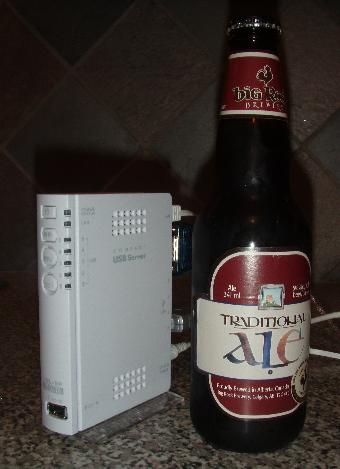
OpenBSD/landisk runs on machines related to the
IO-DATA USL-5P, using a
Hitachi/Renesas
SH-4 CPU.
Note: The "Giga-landisk" and HDL-F machines are ARM-based (both Intel XScale & Marvell), some of which were supported by the defunct armish architecture. |
|
History
OpenBSD/landisk is the 1st OpenBSD port to a Hitachi/Renesas SH-4 based machine. It is hoped that other SH-4 based machines will show up which are interesting enough for our user and development community, but the SH-4 processor is normally used only in true embedded products.
This processor architecture is the first 32-bit successor of a series of extremely bizarre 8 and 16 bit processors by Hitachi. It has a very strange instruction set and MMU, and developers find it quite a challenge to map their knowledge of Unix low-level ideas to the processor architecture.
Current status
Hardware support is mostly complete and quite stable.
Supported hardware
For a complete system component and device driver listing for this architecture, see intro(4/landisk).
- HITACHI SH4 SH7751R processor at 266MHz.
- 64MB of ram.
- re(4) 100Mbit ethernet.
- wdc(4) drive controller connected to either flash or microdrive in a CF socket, on some models.
- pciide(4) IDE drive controller supporting wd(4), on some models.
- com(4) serial port console at 9600 baud (lacking hardware flow control).
- ehci(4) and ohci(4) USB controllers supporting most usb(4) devices.
- power(4) button and some LEDs.
Getting and installing
The latest supported OpenBSD/landisk release is OpenBSD 7.9. Here are the OpenBSD/landisk installation instructions.
Snapshots are made available from time to time, in
this location
as well as on a few
mirrors.
Here are the
OpenBSD/landisk snapshot installation instructions as well.
Serial cable connection
All of these machines require a special serial cable which does voltage conversion, and can hopefully be purchased along with the card. This cable normally contains a little max232 or similar chip which converts from the 3.3V signals to +/-12V. The IO-DATA cable has pins which can grip the inside of the holes. Or you can attempt to build your own using some Japanese instructions.The IO-DATA cable converts from a DB9 connector to a 5-pin header (3.3V Tx Rx GND NC). Note that the Rx and Tx pins on the board are swapped compared to the ARM-based machines made by IO-DATA. All the board models have a 5-pin connector (called CN7) which the cable can plug into -- except for the USL-5P which has a 4-pin header (thus requiring removal of the spare pin).
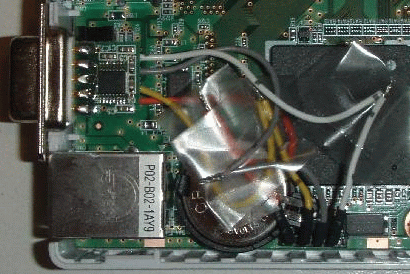
A USL-5P is shown with a modified IO-DATA cable. In this case the cable has been shortened significantly and the DB9 connector is glued into a slot carefully cut into the plastic between the ethernet and a USB port.